Automatically Create Video Watch Pages in WordPress—At Scale
If your site embeds YouTube videos—whether they’re yours or someone else’s—Google expects each video to live on its own dedicated video watch page.
That means a page with a single purpose.
A title.
A description.
The video itself.
And proper VideoObject schema markup.
Nothing extra. Nothing distracting.
If you have a handful of videos, this is manageable.
If you have dozens—or hundreds—it quickly becomes unrealistic.
That’s exactly why YT Bulk Watch exists.
The Problem Google Keeps Pointing Out
Google doesn’t want videos buried inside random blog posts, service pages, or category pages. It wants clear, dedicated video watch pages that it can understand, index, and surface in video search results.
You can see this yourself.
Open Google Search Console.
Go to the Videos report.
Look at the errors.
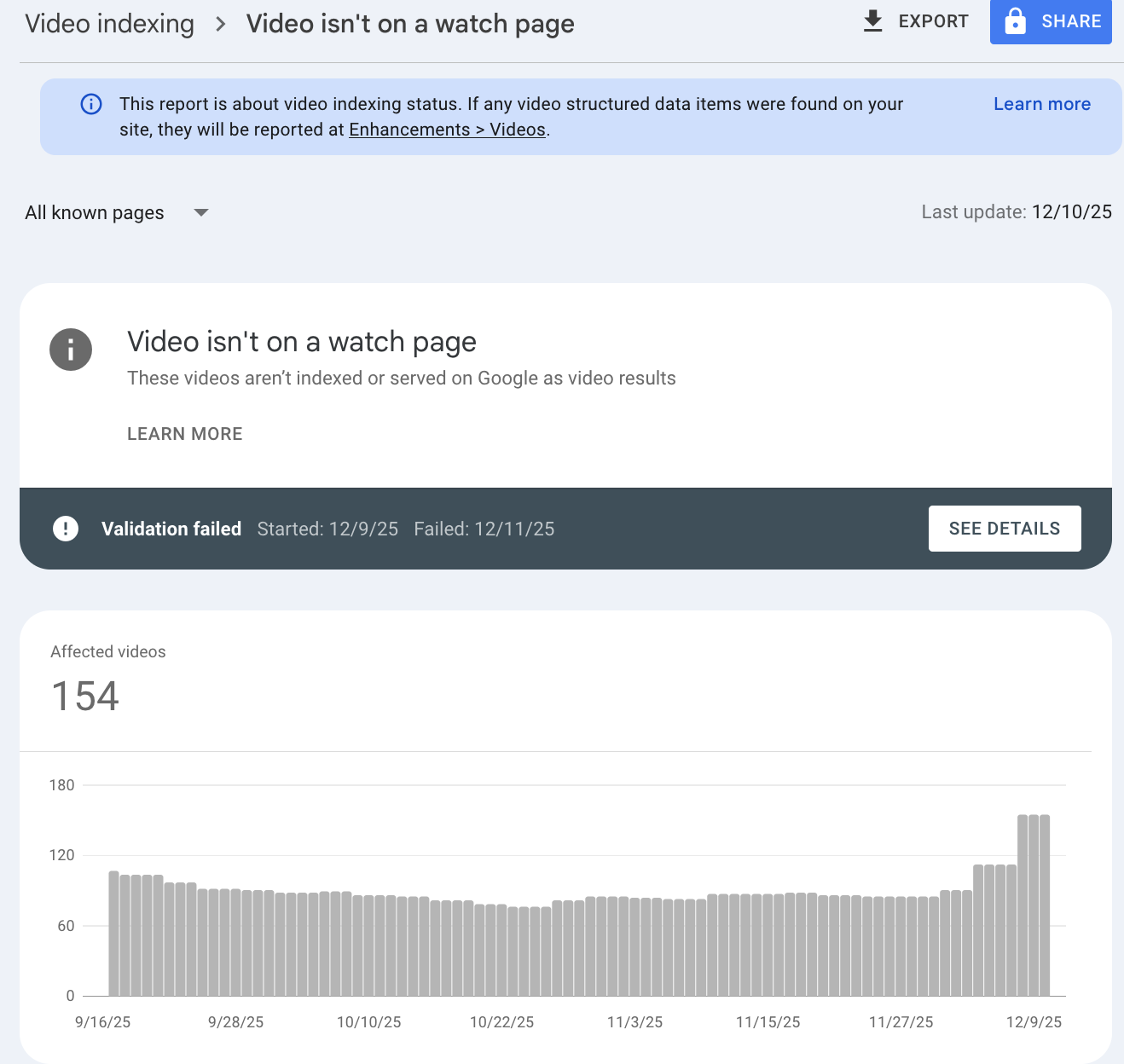
If you see the message that a video is not on a watch page, Google is explicitly telling you that it has found a video, but does not consider the page a valid watch page for indexing that video.
This is not a cosmetic issue. It directly affects whether your videos are eligible for video results, video mode visibility, rich features like key moments, and video previews in search.
Why Video Watch Pages Can Lead to More Traffic
Video watch pages align directly with how Google indexes and evaluates video content.
According to Google’s own guidance, a video is only eligible for video features if it meets specific indexing requirements. One of the most important requirements is that the video is embedded on an indexed watch page where the video is the main content.
When those requirements are met, Google can confidently associate a single URL with a single video. That clarity allows Google to collect signals, evaluate performance, and surface the video in more places across search.
Fixing video is not on a watch page errors can lead to more traffic because it removes barriers that prevent Google from indexing and featuring your videos. In practical terms, dedicated watch pages can result in:
- More videos indexed, because each video has its own eligible watch page.
- More impressions in video results and video mode.
- Increased long-tail traffic from video titles and descriptions.
- Greater eligibility for rich video features like key moments and previews.
- Cleaner reporting and fewer errors in Google Search Console.
If your site has dozens of videos embedded across different pages, but no true watch pages, Google may crawl those videos without ever fully indexing them. Each missing watch page is a missed opportunity.
What Google Explicitly Requires for Video Indexing
Google is very clear about what a video needs in order to be indexed and eligible for video features.
To be eligible, a video must meet the following requirements:
- The watch page itself must be indexed.
- The indexed watch page must perform reasonably well in Search before the video is considered for indexing.
- Just because a watch page is indexed does not guarantee the video will be indexed.
- The video must be embedded directly on a watch page.
- The video cannot be hidden behind other elements.
- If a paywall is used, paywall structured data must be added so Google can still find the video.
- The video must have a valid thumbnail available at a stable URL.
This is where many sites fall short. Videos are often embedded as secondary content, hidden behind tabs, loaded conditionally, or missing consistent metadata. Any one of those issues can prevent video indexing.
Why a Dedicated Watch Page Matters
Google strongly recommends creating a dedicated watch page for each video if you want that video to be eligible for video features.
A watch page is defined as a page where the primary purpose is to show users a single video.
Examples of pages that qualify as watch pages include:
- A video landing page
- A TV episode video player page
- A news video watch page
- A sports highlight page
- An event clip page
Pages that do not qualify as watch pages include:
- A blog post reviewing an embedded video
- A product page with a 360-degree product video
- A category page listing multiple videos
- A movie review page with a trailer embedded
On non-watch pages, the video is considered complementary content. Google may still show those pages as standard search results, but the video itself is far less likely to receive dedicated video visibility.
Why Stable URLs and Thumbnails Matter
Google also requires stability.
If your video thumbnails or video file URLs change frequently, Google may fail to index or maintain indexing for those videos. This is common with some CDNs that use expiring URLs.
To maximize eligibility:
- Each video should have a single, stable thumbnail URL.
- Video files should be accessible via stable URLs when possible.
- Stable URLs help Google confirm availability, collect signals, and process features like key moments.
YT Bulk Watch pulls consistent video metadata from the YouTube API, ensuring that titles, descriptions, thumbnails, and durations are aligned with what Google already understands about the video.
Why I Built This Plugin
I run a YouTube channel with roughly 180+ videos.
There was no chance I was going to manually build 180 individual video watch pages. Not happening.
At the same time, one of my SEO clients had a large video library and had just launched a podcast. Their internal estimate to create proper watch pages was 20–40 hours of developer and content time.
That’s expensive.
And unnecessary.
So I had a WordPress plugin built to do the heavy lifting automatically.
What YT Bulk Watch Does
YT Bulk Watch connects directly to the YouTube API and handles the work that normally eats up hours of manual effort.
You provide a list of YouTube video URLs.
The plugin pulls the data Google expects to see.
WordPress pages are generated automatically.
Each video gets its own dedicated watch page with:
- A unique page title tied to the video
- The full video description
- An embedded video player
- Upload date and duration
- Complete VideoObject schema markup
Every page is created as a Draft, not published live.
That means nothing breaks.
Nothing goes public accidentally.
And you stay in full control.
You can review, edit, apply templates in bulk, and publish when you’re ready.
Built for Real-World WordPress Sites
YT Bulk Watch does not try to control your theme or page templates.
Every WordPress site is different.
Every theme handles layouts differently.
Instead, the plugin focuses on what matters: creating clean, valid watch pages that align with Google’s documented video indexing requirements.
Designed to Be Safe and Controlled
To prevent performance issues, page creation is intentionally limited.
You can submit up to 20 video URLs at a time.
This avoids excessive API calls and keeps WordPress from getting overloaded while pages are generated.
Since everything starts in Draft mode, there’s no risk of cluttering your live site or exposing unfinished pages.
It’s controlled.
Predictable.
And safe to use on production sites.
A Direct Response to Google Search Console Errors
One of the most effective uses of YT Bulk Watch is responding directly to Google Search Console video errors.
Google tells you which videos are not on valid watch pages.
You export that list.
Paste the URLs into the plugin.
Generate compliant watch pages.
Instead of guessing what Google wants, you are implementing exactly what Google documents as best practice.
Who This Plugin Is For
YT Bulk Watch is ideal if you:
- Run a YouTube channel and want video-driven organic traffic
- Manage SEO for clients with large video libraries
- Publish podcasts with video versions
- Want eligibility for video features without manual work
- Are tired of writing and maintaining video schema markup by hand
Current Status
The plugin is ready and is available. Contact us directly for pricing. We will send you the latest version of the plugin.
Previously, early versions required minor adjustments to align with Google’s watch page requirements. Those changes are now complete.
The goal is simple:
Create pages Google recognizes as legitimate video watch pages—consistently and at scale.
Video watch pages are no longer optional if you want visibility in video search.
Creating them manually does not scale.
Ignoring Search Console warnings costs traffic.
YT Bulk Watch turns hours of repetitive work into minutes.
You get the SEO benefit.
Without the grunt work.